Introduction
Most security failures don't start with sophisticated intrusions. They start with a propped-open door, a shared key card, or an entry point that nobody's watching.
Texas school intruder audits from 2024–2025 found that 88.67% of successful unauthorized entries used secondary entrances — not main doors — and auditors reached the main office without being stopped in over half of those cases. That's not a technology failure. That's a planning failure.
Physical access control systems (PACS) define who can enter a space, when, and under what conditions. Every organization with a facility to protect needs one — schools, museums, houses of worship, transit authorities, and campuses all face this same problem at different scales.
What follows is a practical breakdown of how PACS works — the components, the authentication methods, the sector-specific risks, and what separates a strategy that holds from one that fails at the secondary entrance.
Key Takeaways
- Physical access control systems (PACS) use authentication and authorization to regulate who enters, when, and where — giving organizations precise control over every entry point
- Core components include access points, credential readers, control panels, servers, and electronic locks
- Credential options range from key cards to biometrics, with higher security requiring multi-factor authentication
- Each sector — schools, houses of worship, museums, transit systems — has distinct threat profiles that require purpose-built access control designs
- Federal grants through FEMA's Nonprofit Security Grant Program (NSGP) and the COPS School Violence Prevention Program (SVPP) can fund PACS upgrades for eligible organizations
What Is Physical Access Control?
NIST defines a physical access control system as "a system that controls the ability of people or vehicles to enter a protected area by means of authentication and authorization." The gap between a basic key lock and a modern PACS, however, is enormous.
A traditional key tells you nothing. It can't log who used it, when, or whether the right person was holding it. A PACS answers all of those questions — and creates an auditable record every time.
What modern PACS enables that a key cannot:
- Granular control over who accesses which area and during what hours
- Real-time monitoring of every entry attempt
- Remote credential management — grant or revoke access in seconds
- Time-stamped audit trails for compliance and incident investigation
- Emergency lockdown capability across an entire facility or campus
Physical vs. Logical Access Control
These two terms get confused, but they govern entirely different domains. Physical access control restricts entry to spaces — buildings, rooms, restricted areas, vehicles. Logical access control restricts entry to digital systems, networks, and data.
The risk emerges when organizations manage these independently. An employee terminated on a Friday may have their network access cut immediately — but still hold a working badge on Monday. Managing physical and logical access in silos creates exactly that kind of gap, one that both insider threats and external actors can exploit.
Core Components of a Physical Access Control System
Federal PACS guidance from identitymanagement.gov identifies a five-part architecture that forms the backbone of any system. Understanding each component helps organizations evaluate what they have, what they're missing, and what they actually need.
Access Points
Access points are the physical barriers — doors, turnstiles, security gates, vehicle barriers — where authentication occurs. Not all access points carry equal risk. A server room requires different controls than a lobby. A loading dock presents different threats than a public entrance.
Risk profiling each access point should drive the PACS design from the start — not get tacked on at the end.
Credential Readers and Control Panels
Readers capture credential data from cards, fobs, mobile devices, or biometrics and transmit it to the control panel. Reader placement, tamper resistance, and weather rating all affect real-world security — an exposed reader with no tamper protection is a vulnerability regardless of the credential technology it reads.
The control panel is the decision engine. It receives credential data, checks it against the authorized user database, and triggers the access point to lock or unlock. Policy lives or dies here.
Access Control Server and Electronic Locks
The access control server — cloud-based or on-premise — stores user identities, access privileges, and audit logs. Administrators add or revoke credentials, pull entry reports, and review attempt histories from here.
That data layer only works when paired with the right lock hardware at every entry point. PACS uses electronically controlled locks in two configurations:
| Lock Type | Behavior on Power Loss | Typical Application |
|---|---|---|
| Fail-safe | Unlocks automatically | Required for fire egress doors under NFPA 101 |
| Fail-secure | Remains locked | High-security internal areas (server rooms, vaults) |
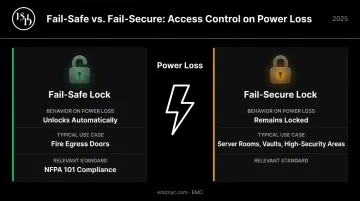
Entry and exit doors on required means of egress must generally use fail-safe locks to meet fire safety regulations. Using fail-secure hardware on an egress door without proper code review is a liability.
Authentication Methods: How Identity Gets Verified
Credential choice is one of the most consequential decisions in PACS design. The right credential for a school lobby is rarely the right credential for a data center — security level, user volume, and operational context all drive the decision.
Cards, Fobs, and the Migration Problem
Proximity RFID cards remain the most common credential — ASIS research puts current proximity card use at 45% of organizations. But the same research shows 125 kHz low-frequency proximity cards (the older, lower-security standard) dropping from 51% in 2019 to 22% — a clear sign that organizations are acting on a well-documented cloning vulnerability.
The core problem with cards and fobs: they verify the credential, not the person. A lost or stolen card grants access to whoever picks it up.
Mobile Credentials
Smartphones replace physical cards using Bluetooth or NFC, with an admin configuring permissions through a management app. Most phones require biometric or passcode authentication before use, which adds a layer of protection that a plain keycard cannot match. Remote revocation happens in seconds, not days.
Mobile credentials are particularly practical for vehicle access scenarios where staff can present credentials without leaving their car. The cost model differs from cards: mobile credentials often use subscription pricing, while physical cards are a one-time hardware cost.
PIN Entry and Multi-Factor Authentication
Keypads as a standalone authentication method are weak — PINs get shared and observed. As a second factor layered with card access, they're a significant security upgrade.
High-security environments — data centers, research labs, exclusion zones — typically require two or three authentication factors:
- Something you have (card, fob, mobile device)
- Something you know (PIN, passcode)
- Something you are (biometric)
NIST SP 800-116 provides a risk-based framework for selecting authentication mechanisms appropriate to the sensitivity of each area.
Biometrics
Fingerprint, facial recognition, iris, and palm scanning offer the highest assurance because biometric data is unique and non-transferable. Before deploying any biometric system, organizations need to weigh three practical challenges:
- Equipment cost — readers and enrollment hardware run significantly higher than card-based systems
- Privacy and policy — biometric data collection requires a documented governance policy before deployment, not after
- Enrollment overhead — every user must be enrolled in person, adding ongoing administrative work
Data governance deserves particular attention: where biometric templates are stored, who has access, and what the retention schedule is should be defined at the design stage.
Why Physical Access Control Matters Across High-Risk Environments
Insider and Outsider Threats
Unauthorized access threats don't come exclusively from outside. CISA defines insider threat as the potential for an insider to use authorized access — or knowledge gained through it — to harm an organization's facilities or personnel.
Common insider-category risks include:
- Former employees whose credentials were never deactivated
- Contractors with access rights broader than their role requires
- Visitors who wander beyond escorted areas into restricted zones
A PACS creates the audit trail that detects these behaviors and the policy framework that limits their impact before damage is done.
Environment-Specific Challenges
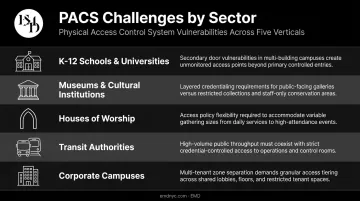
Those insider risks play out differently depending on the environment. EMD works across sectors where PACS requirements diverge sharply:
- K-12 schools and universities: Open campus culture conflicts with controlled entry needs — secondary doors, not front entrances, are the most commonly exploited weak point.
- Museums and cultural institutions: Public-facing galleries and restricted conservation areas require layered credentialing that shifts between public hours and after-hours operations.
- Houses of worship: Minimal staffing during large open gatherings means access policies must flex between service hours and weekday operations.
- Transit authorities: High-volume throughput requires fast credential processing at public access points while maintaining strict verification for control rooms, maintenance areas, and vehicle depots.
- Corporate campuses: Multi-tenant environments add complexity — IP protection, visitor management, and zone separation must all coexist within a single credentialing system.
Regulatory Drivers
Three sectors carry specific compliance requirements for physical access:
- Healthcare organizations under HIPAA must implement physical safeguards for areas containing protected health information
- Federal contractors under HSPD-12/FIPS 201 must use PIV-compliant credentials for facility access
- Educational institutions receiving federal funding face security standards tied to that funding
Non-compliance carries penalties, loss of funding, and liability exposure. A well-documented PACS with audit logs is also a compliance asset — it generates the audit evidence regulators and insurers require.
Planning and Implementing Your Physical Access Control Strategy
Assess Before You Install
Selecting technology before completing a risk assessment leads to predictable failures: over-engineered systems that staff work around, or under-protected entry points that leave real gaps exposed.
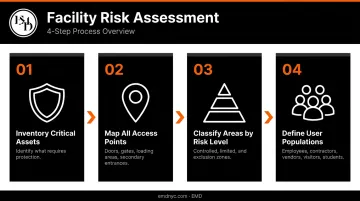
A facility risk assessment should:
- Inventory critical assets — what you're protecting determines the level of protection required
- Map all access points — every door, gate, loading area, and secondary entrance
- Classify areas by risk level — controlled (general staff access), limited (authorized personnel), exclusion (highly restricted)
- Define user populations — employees, contractors, vendors, visitors, and students each present different access management requirements
EMD's vulnerability assessment methodology evaluates physical infrastructure — perimeter, access control points, doors, locks, surveillance coverage — against real-world threat scenarios including active assailant, organized targeting, and opportunistic crime. That risk profile drives PACS design, not the other way around.
Standalone vs. Enterprise PACS
| Factor | Standalone PACS | Enterprise PACS |
|---|---|---|
| Scope | Single facility | Multiple sites, network-connected |
| Administration | Local | Centralized |
| Policy consistency | Site-specific | Uniform across locations |
| Audit correlation | Per-site only | Cross-site visibility |
| Best fit | Single-location organizations | School districts, multi-campus universities, transit authorities |
For multi-site organizations, standalone systems create compounding operational problems: policy enforcement drifts between locations, audit trails can't be correlated across sites, and administrative overhead multiplies with each additional facility.
Funding Your PACS Project
Capital budget constraints block many of the sectors that need PACS upgrades most. Federal programs exist specifically to address this:
- FEMA NSGP: FY25 total availability was $274.5 million for nonprofit organizations at elevated risk of terrorist or extremist attack. Eligible enhancements explicitly include electronic locksets, card readers, access-controlled doors, and visitor management systems.
- COPS SVPP: FY25 made up to $73 million available for K-12 schools, with awards covering up to 75% of allowable costs and a maximum federal share of $500,000 per applicant. Door locking mechanisms and access control doors are listed as allowable costs.
EMD has documented success securing consecutive NSGP awards for clients including a charter school in Hawaii and a house of worship — with funded improvements including access control software upgrades, electronic locks, and visitor management systems.
Navigating these applications successfully means knowing which costs qualify, how to frame the security narrative for reviewers, and how to meet each state's specific submission requirements — details that determine whether an application moves forward or stalls.
Physical Access Control Best Practices
A well-designed PACS is only as effective as the policies and habits surrounding it. Three practices separate programs that work from programs that look good on paper:
- Set least-privilege permissions for every role and audit them regularly. Stale credentials — from former employees, expired contractors, and inactive visitors — are among the most preventable vulnerabilities in any access control program.
- Integrate with adjacent systems. Camera integration catches tailgating and credential sharing that hardware alone misses. ASIS research found that 41% of organizations have linked visitor management with access control; that's notable progress, but most still lack that connection. Effective integration spans video surveillance, intrusion detection, and emergency notification so each system reinforces the others.
- Back technology with written policy and staff training. Propped doors, shared credentials, and unreported suspicious activity can undermine even a well-configured system. A formal policy defining how access rights are added, modified, and revoked is as important as the hardware itself.
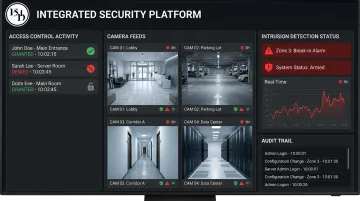
EMD's design consulting addresses access control, CCTV layout, intrusion detection, emergency notification, and CPTED as an integrated framework. EMD's AI-augmented assessment methodology also identifies human-factor and operational gaps — not just infrastructure gaps — because both determine whether a PACS functions as designed.
Frequently Asked Questions
What are the 4 types of physical security?
The four primary categories are deterrence (fencing, signage, lighting), detection (alarms, sensors, cameras), delay (barriers, reinforced doors, controlled entry), and response (security personnel, emergency systems). Physical access control spans all four — it deters unauthorized entry, detects access attempts, delays intruders, and supports response through lockdown capability and audit trails.
What is the difference between physical access control and logical access control?
Physical access control restricts entry to buildings, rooms, and restricted areas. Logical access control restricts access to digital systems and data. Mature security programs align both — when an employee is terminated, physical credentials and digital access should be revoked at the same time.
What credentials are most commonly used in physical access control systems?
The most common credential types are key cards, key fobs, mobile app credentials, PIN keypads, and biometrics. The right choice depends on the required security level, the user population, and budget. Higher-security areas typically combine two or three credential types through multi-factor authentication.
What is the difference between a standalone PACS and an Enterprise PACS?
A standalone PACS manages access for a single facility locally. An Enterprise PACS connects multiple sites — school districts, transit authorities — under a unified system with centralized administration, consistent policy enforcement, and cross-site reporting.
How do I know what level of access control my building needs?
Start with a facility risk assessment that identifies asset sensitivity, user volume, and compliance requirements for each area. A security consultant maps those risk levels to the right authentication mechanisms — avoiding both over-engineering and under-protection.
Can physical access control system upgrades be funded through grants?
Yes. FEMA NSGP and COPS SVPP both cover access control improvements — electronic locksets, card readers, and access-controlled doors — for eligible organizations. Working with a security consultancy experienced in grant procurement improves award success rates by ensuring costs qualify and applications meet state-specific requirements.